
From first enquiry
to a verified community.
A working onboarding path, private Exness reports and a live market-data demonstration. Take the service code, four n8n workflows and the steps to connect your own accounts.
LIVE · MUSE SPARK 1.3 CONTRIBUTOR
New: the full client journey. Explore onboarding, qualification, follow-up, education and re-engagement workflows.
The client journey
Start with permission
Submit the form, follow its Telegram link and agree to private onboarding. Or start directly in Telegram.
Know who is asking
The partner checks identity. Exness then confirms whether that client is attributed to the partner.
Make the next step clear
Show the client’s own status and reported activity, handle community join requests and offer a human handoff.
An interpreter in the background.
Telegram is the interface. The model interprets the question; the service checks identity and permissions, reads the allowed API, and replies. Account figures come from the API. Muse Spark 1.3 Contributor is connected directly through Meta. Clients see its data-use notice and opt in before ordinary-language questions are processed. Commands remain available without that AI opt-in. Gemini, GLM and OpenRouter adapters are also included for your own setup.
What the API can show here
| Client, after verification | Partner, privately |
|---|---|
| Partner attribution, KYC, first-deposit and first-trade status | Clicks, registrations, KYC and trading-start totals |
| Deposit, balance and equity bands; trading volume; reported rebates | Deposit and volume totals; partner rewards; authorised client lookups |
Bands are ranges, not exact balances. Volume is trading activity, not money spent. These reads do not provide a complete withdrawal, fee or profit/loss ledger. Clients complete registration, KYC and funding in their own Exness account.
A live feed the room can see
The demonstration uses Kraken’s public BTC/USD market data. It excludes the unfinished candle, checks freshness, formats an observation and publishes it once. The post identifies the source and clearly labels itself as an automation demo.
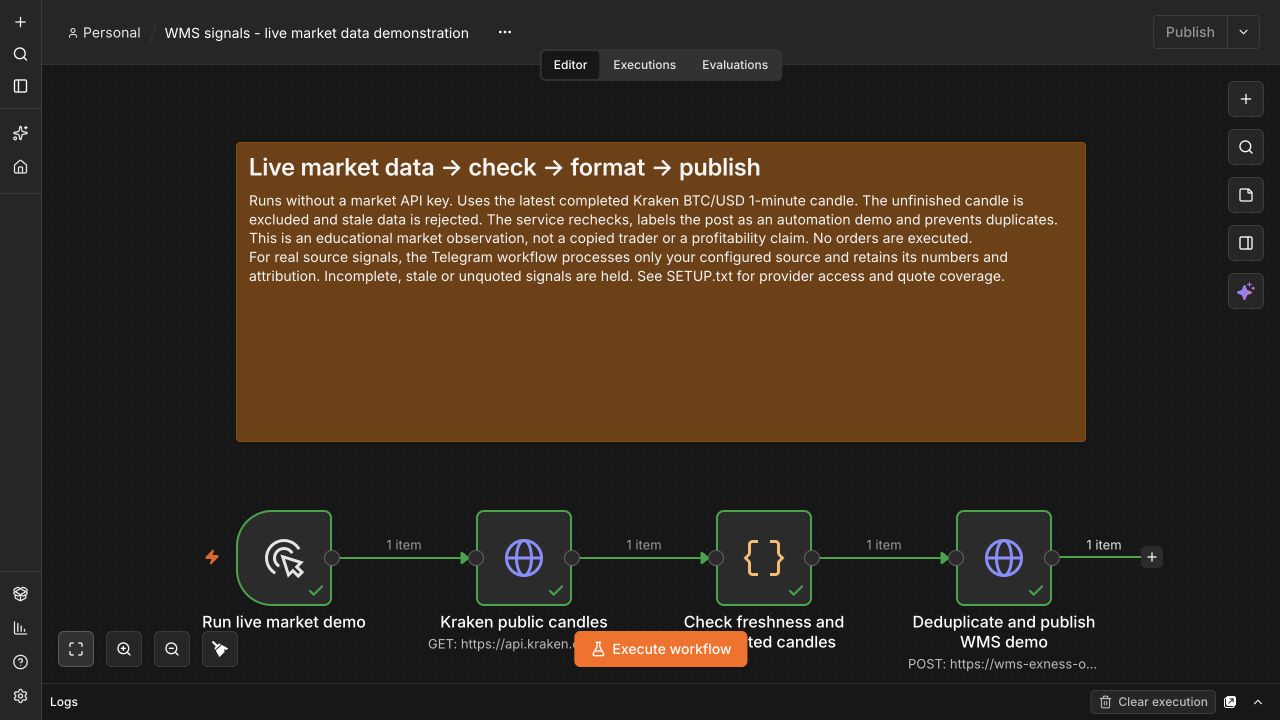
Actual successful n8n rehearsal, 2 October 2026. This is a market observation, not a copied trader’s signal or evidence of profitability.
When you connect a signal provider
The source workflow keeps attribution and price levels intact. It holds incomplete, stale or expired signals, and checks the live quote before publishing. Autochartist is a structured API option; Trading Central offers commercial API access. Neither provider is connected in this workshop kit.
The requested Telegram source, @learnwithmarketgod, still needs source-channel access. Only BTC/USD has a quote adapter in this edition. Other instruments remain held until a suitable quote feed is connected and tested.
Four files to import. One service to deploy.
- Private Exness connectorCredential-protected access to four read operations.
- Telegram onboardingConsent, profile, identity review, reports and join requests.
- Form and CRM syncCapture records and maintain the private onboarding sheet.
- Market-data demonstrationA visible feed → check → format → publish path.
The ZIP includes the service source, database migrations, setup guide, source comparison, capability notes and tests. Use your own accounts and credentials. The workshop version has documented limits of 499 form submissions per read and 500 profiles per CRM export.